OpenReel brings timeline-based video editing to the browser for free
OpenReel Video is a free, open-source video editor that runs entirely in the browser or on mobile apps, with no uploads required and all files staying on the user's device.
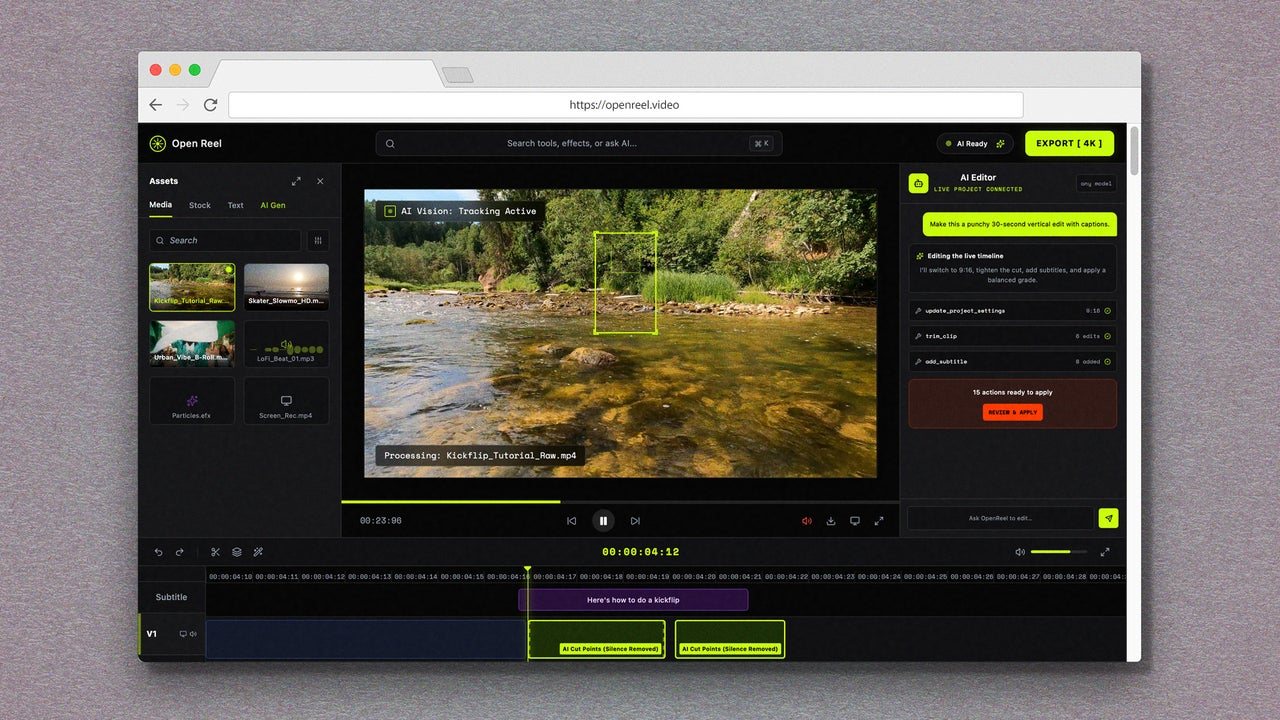
OpenReel Video offers a full-featured, timeline-based video editor that runs entirely in a web browser, giving users a free alternative to desktop software like iMovie without requiring any installation. The open-source tool works on any computer through the browser, and dedicated Android and iOS apps are also available for mobile editing. Users can open the site or app and begin working immediately, with simple projects completed in as little as a minute or two.
The service is designed for people who need more than the basic trimming tools built into phone photo apps. Timeline-based editing allows users to combine multiple video clips into a single file, adjust transitions, add captions, and layer in background music. The interface follows a familiar layout for anyone who has used editing software before: assets appear in a left panel, a preview window sits in the center, an inspector panel is on the right, and the timeline runs along the bottom where clips are dragged and arranged.
A key feature of OpenReel is its privacy approach. The software does not require users to upload their videos to any server; all processing happens locally on the device. This means video files and other assets always remain on the user's own storage. The trade-off is that performance may suffer on older or resource-limited devices, since the editing workload falls on the local hardware rather than remote servers.
OpenReel includes several AI-powered tools to simplify the editing process. Automatic captions can be generated for clips, filters are available for visual adjustments, and a text-to-speech option provides narration without requiring the user to record their own voice. These features aim to reduce the learning curve, though the application still expects users to invest time in understanding the basics of timeline editing, much as they would with any professional-grade tool.
Once a project is complete, users can export the final file and save it directly to their device. The export quality has performed well in testing. The service is completely free, with no advertisements, no premium upsells, and no requirement to create an account or share personal information.
For mobile users, the web version can also be accessed through a phone browser by switching to desktop view from the browser menu. The combination of cross-platform availability, local processing, and zero cost makes OpenReel a practical option for anyone who occasionally needs to edit videos but does not want to invest in expensive software or cloud-based services that require uploading personal footage.
75